
Castle - Make and Play
Monterey's Coast, Inc.Art & Design
4.72.74K Reviews
- Version
- 282.0
- Installs
- 10.00M
- Age Rating
- Teen
Screenshots
Our Review of Castle - Make and Play
 Analysis by Appyee
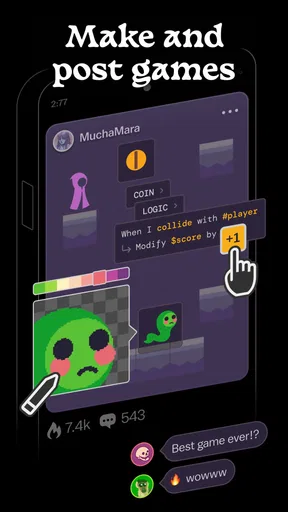
I approached Castle - Make and Play less like a conventional mobile game and more like a small creative playground. Its central idea is appealing: instead of only consuming finished games, I can explore, play, and create inside the same social space. That combination makes it feel different from a typical art app, a standard game platform, or a feed built only for watching other people’s work.
Castle sits in the Art & Design category, but that label only tells part of the story. In practice, it is aimed at people who enjoy experimenting with interactive ideas, sharing them, and discovering what other users have made. I found the experience most interesting when I treated it as a place for quick creative experiments rather than expecting a full development environment. It is free to install, with optional in-app purchases ranging from $0.99 to $9.99 per item, and its Teen content rating is worth keeping in mind before introducing it to younger users.
How Castle feels today as a creative social space
The first thing that stands out is the change in mindset it encourages. On most social platforms, I scroll through images, clips, or messages. On a normal mobile game store, I choose a finished product and play it. Castle brings those activities closer together: I can look at someone’s creation, interact with it, and then think about making something of my own.
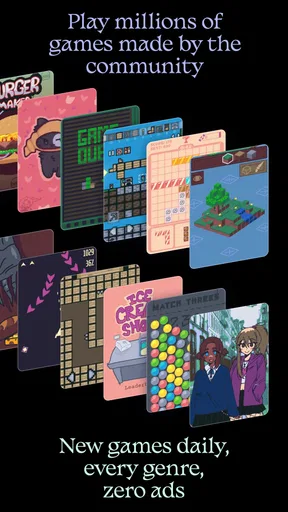
That makes the app especially attractive to curious users who like seeing how simple ideas become playable experiences. You do not need to approach every creation as a serious game. Some are better understood as visual experiments, tiny challenges, interactive scenes, or playful sketches. The value comes from the variety and from the feeling that the community is sharing things to be tried, not merely displayed.
I also noticed that this format changes how I judge quality. A short creation does not need the depth of a large commercial game to be worthwhile. A clever interaction, an unusual visual arrangement, or a funny idea can be enough. That is a strength, because it lowers the pressure on creators. It is also a limitation, because users looking for polished, long-form entertainment may find the experience uneven.
The app is developed by Monterey's Coast, Inc., and it has reached over 10 million installs with an average rating of 4.7 from around 150 thousand ratings. Those figures suggest that the concept has found a substantial audience, but they do not remove the need for personal patience. A large creative community naturally produces a mixture of memorable work, rough experiments, and creations that simply will not match your taste.
The best way to start without feeling lost
My advice is not to begin by trying to understand every possibility at once. Spend time exploring first. Notice which creations hold your attention and ask yourself why: was it the visual style, the interaction, the surprise, or the simplicity? This gives you a practical sense of what Castle is good at before you attempt to build anything.
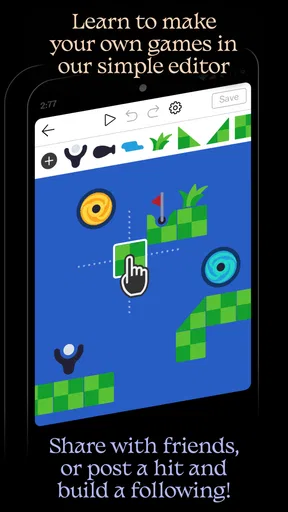
When you do create, start with one clear action. A small idea that communicates itself quickly is more satisfying than an ambitious project that becomes difficult to finish. I would treat the first creation as a sketch, not a portfolio piece. That approach makes experimentation easier and helps reveal which parts of the creative process feel natural to you.
A useful workflow is to separate discovery from making. I would explore when I have a few spare minutes, save mental notes about ideas I enjoy, and return later with one specific concept. Trying to invent, edit, test, and share while distracted can make the process feel more complicated than it needs to be. Castle works better when I give each activity its own short session.
What the current version tells us about its direction
The current version is 282.0, while the app was released on February 16, 2021. That combination matters because Castle is not a brand-new experiment waiting to prove whether its idea works. It has had time to develop an identity around user-made, playable content and social discovery.
I would not read the version number as a promise that every part of the experience will suit every user. Instead, it indicates an established product that has continued moving forward. For someone deciding whether to try it, the more useful question is whether the make-and-play loop fits their habits. If you enjoy interactive creativity and community browsing, the app’s evolution is encouraging. If you only want a conventional game with a fixed campaign, a later version will not change the basic mismatch.
For existing users, a current release is mainly valuable when it keeps the central experience usable while the community grows. A platform like this depends on people being able to move between discovering creations and contributing their own. Even small improvements to that flow can matter more than flashy additions, because friction in browsing, testing, or sharing can discourage both players and creators.
I would also keep expectations realistic around continuity. Creative platforms evolve through their communities as much as through their software. The things that make Castle interesting today may be the kinds of creations users are sharing, the styles that become popular, or the way new participants interpret the tools. That means the app can feel fresh, but it can also feel inconsistent from one visit to the next.
Who benefits most from the make-and-play format
Castle is a strong fit for people who enjoy low-pressure creativity. If you like drawing, arranging visual elements, imagining small game rules, or trying unusual interactive ideas, the app gives those interests somewhere to meet. It may also appeal to someone who wants to learn by imitation: exploring other users’ work can provide more useful inspiration than staring at a blank project.
It is also suitable for casual players who want short bursts of discovery rather than one large commitment. I can imagine opening it while waiting for an appointment, trying a few creations, and leaving with an idea to revisit later. The important distinction is that the app is not only a time-filler. It can become a creative habit if I move from playing other people’s work to making small experiments myself.
Families and parents should pay attention to the Teen rating and treat the social side as part of the decision. The app is not simply a private drawing tool. It combines creation with community participation, so the right level of supervision depends on the user’s age, maturity, and comfort with social platforms. I would explain that public creativity brings both inspiration and content that may not be personally appealing.
On the other hand, I would not recommend it as the first choice for someone who wants professional illustration tools, advanced animation control, or a structured course. A dedicated art application is likely better for precise drawing and production work. Likewise, someone looking for competitive matchmaking, a deep progression system, or a carefully directed single-player adventure should choose a conventional game instead.
A realistic everyday use case
Imagine having twenty minutes after school or work and wanting something more active than scrolling through videos. I would open Castle and spend the first few minutes trying creations from different users. If one interaction gives me an idea, I could switch from player to creator and build a very small response: perhaps a visual joke, a simple challenge, or a scene with one surprising action.
The important part of this scenario is the short feedback loop. I can test whether the idea is understandable without investing an entire evening. If it feels confusing, I can simplify it. If it works, I can share it and see whether other people enjoy the same small moment. That process is much closer to sketching than to producing a finished commercial game, and that is exactly why it can be approachable.
There is a trade-off, though. A quick creative session can easily become an extended browsing session, especially when the community feed keeps presenting new things to try. I would set a personal stopping point if I needed to protect my time. The social discovery layer is part of the appeal, but it can also pull attention away from the making side that gives the app its deeper value.
Where it differs from familiar alternatives
Compared with a normal art app, Castle makes the result interactive and social rather than keeping it as a private image or design file. That is exciting if I want people to experience an idea instead of merely look at it. The compromise is that it is not the place I would choose for detailed, professional visual work where control, precision, and export options are the priority.
Compared with a traditional game platform, Castle puts more emphasis on user creativity and variety. I am not only selecting from professionally produced titles; I am exploring a stream of ideas that can be much smaller and stranger. The benefit is discovery. The drawback is that quality and depth vary, so I need to browse actively instead of assuming every item will deliver a polished experience.
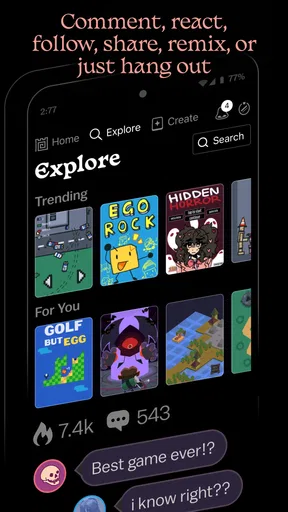
Compared with a general social network, the interaction is more focused. The shared object is not just a post or photograph; it is something I can play with. That gives conversations a practical starting point, because the creation itself can be tested and discussed. Still, users who prefer a quiet, private workspace may find the community-centered design distracting.
Small habits that improve the experience
One of the most useful habits is to judge a creation by its intended scale. I try not to dismiss a short piece simply because it ends quickly. Instead, I ask whether it delivers one clear idea. This helps me find worthwhile experiments that might be overlooked when I expect every entry to behave like a full game.
Another tip is to test my own work as a stranger would. After making something, I would return to it without relying on memory of how it was built. If the purpose is not obvious, I would remove steps rather than adding more decoration. In a social creative environment, clarity often matters more than complexity because people may only give an unfamiliar creation a brief chance.
I would also keep a personal boundary around purchases. Castle is free, but optional items cost between $0.99 and $9.99 each. That does not make the app unsuitable, yet it means I would check what an item adds to my experience before buying it. The strongest reason to use the app should be the creative and social loop, not the assumption that spending is required to make the platform worthwhile.
Finally, I would use the community as a source of prompts rather than as a scoreboard. Comparing my first experiments with someone else’s most appealing work can make the process discouraging. A better approach is to borrow one technique or idea, adapt it, and then move on. Castle is more rewarding when I measure progress by clearer concepts and more confident experiments.
The friction that remains
The open-ended nature of the platform is both its identity and its biggest weakness. New users may wonder what they are supposed to do first because there is no single path through the experience. Exploration, creation, and social participation can be liberating, but they can also feel scattered if I arrive expecting a guided tutorial or a defined objective.
Discovery may also require patience. A community feed can contain excellent work alongside experiments that are unfinished, repetitive, or simply not aimed at me. That is normal for a user-generated platform, but it means the app’s value depends partly on my willingness to curate my own attention. Someone who wants consistently polished content may prefer a professionally edited game library.
The social element introduces another consideration: sharing is not automatically the same as receiving useful feedback. I would not install Castle solely for validation or rapid audience growth. The healthier expectation is to make things because the process is enjoyable, then treat reactions as an extra benefit. That mindset protects the creative side from becoming dependent on external response.
There is also a practical difference between enjoying small experiments and building a substantial project. Castle’s appeal is strongest when I embrace compact ideas and quick iteration. If my goal is to create a large, highly structured game with extensive production controls, I would look toward a dedicated game-development tool. Castle can spark ideas and make them playable, but it should not be confused with a full professional engine.
What I would watch as the app continues
For the future, I would watch how the balance between making and browsing develops. A creative platform succeeds when new users can understand the basics quickly, while experienced users still have reasons to return. If Castle continues improving that bridge, it can remain approachable without losing its experimental character.
I would also pay attention to how the community shapes the atmosphere. More users can bring more variety, but growth only helps if discovery remains enjoyable and creators feel that their work can be found. The most important evolution is not necessarily a larger collection; it is a better connection between a person’s idea and the people who might enjoy playing it.
The current release and the app’s established presence make Castle worth trying now, especially for people who want a creative outlet that feels more interactive than drawing and more open-ended than a normal game. I would approach it with curiosity, a modest first project, and sensible limits around social browsing and optional purchases.
My final view is that Castle - Make and Play succeeds because it treats games as things people can make, share, and experience together rather than finished products that only flow in one direction. It is not the best replacement for a professional art suite, a traditional game, or a private creative journal. But if you enjoy playful experiments and want your ideas to become something others can interact with, I think it offers a distinctive place to start.
Verdict
Strengths of Castle - Make and Play
- Easy drag-and-drop tools make castle building accessible to beginners.
- Creative freedom lets players design unique castles and fantasy scenes.
- Playful visuals and animations make creations feel lively and engaging.
- Suitable for short play sessions without demanding complex controls.
- Encourages imagination through building, decorating, and experimenting.
Limitations of Castle - Make and Play
- Some building options may feel limited without additional content or updates.
- The interface can take time to learn when managing many objects.
- Large creations may cause slower performance on older devices.
- Replay value may decrease after completing the available building activities.
- Certain features may require an internet connection or in-app purchases.
Similar Picks in This Category
View All
Canva: AI Photo & Video Editor
Canva4.8

PENUP – Drawing-sharing SNS
Samsung Electronics Co., Ltd.4.5

Crafto
Kutumb App4.6

Sketchbook
Sketchbook4.1

ibis Paint X
ibis inc.4.5

Adobe Express: AI Photo, Video
Adobe4.6
Frequently Asked Questions
What is Castle - Make and Play?
Castle - Make and Play is a creative building and design game focused on constructing your own castle and surrounding world. You can place rooms, decorations, characters, and other interactive elements while experimenting with different layouts. It is aimed at players who enjoy open-ended creativity rather than fast-paced combat, although the exact activities available may depend on the version and device you use.
Is Castle - Make and Play free to download?
The app may be available to download for free, but users should check the store listing carefully because some content, items, or features can require in-app purchases. Free access may include the basic building tools and a selection of objects, while additional decorations or creative options could be offered separately. Review the purchase settings before allowing children to play.
Can children play Castle - Make and Play safely?
Castle - Make and Play appears suitable for younger players because its main focus is imaginative construction and playful exploration. However, parents should still review the app’s privacy information, advertising behavior, and possible online or purchase features. If the game is being used by a child, enabling parental controls and disabling unauthorized purchases is recommended before handing over the device.
Does Castle - Make and Play require an internet connection?
Whether an internet connection is needed can depend on the feature being used and the platform version. Basic creative play may work offline after installation, but downloading updates, restoring purchases, accessing online content, or using connected features may require Wi-Fi or mobile data. If you plan to use it while traveling, test the main building tools offline first.
What devices support Castle - Make and Play?
Castle - Make and Play is designed for mobile devices, but compatibility can vary between Android and iOS models. Before downloading, check the official store page for the required operating-system version, available storage, and device restrictions. Older phones or tablets may experience slower loading, reduced visual quality, or limited performance when many objects and characters are placed in a scene.
